
The Tonygame7 login button sits in the right-hand panel of the lobby, above the AUD balance, next to Register. Sign-in takes a mobile number or username and a password of 6 to 20 characters, with an optional Remember Me box. If sign-in fails, the "Forgot Your Password?" link under the password field resets access through the registered mobile number. Live chat in the bottom bar handles the cases the reset does not fix.
Most login problems at Tonygame7 come from one of four situations. The table pairs each with the fastest fix.
| Situation | What to do |
|---|---|
| Forgot the password | "Forgot Your Password?" link on the login form, then reset via the registered mobile number |
| Wrong number format | Enter the mobile number in the format used at sign-up, for example 614XXXXXXXX |
| SMS code not received | Wait a minute, check signal and blocked senders, then press the button again or ask live chat |
| Site does not open | Use an official Aussie link (tonygame7.org or tonygame7.org) or the backup link in live chat |
| Account locked | Contact live chat with the registered mobile number and full name |
Each of these fixes keeps the existing account and balance. Opening a new account is never the fix (see "One person, one account" below).
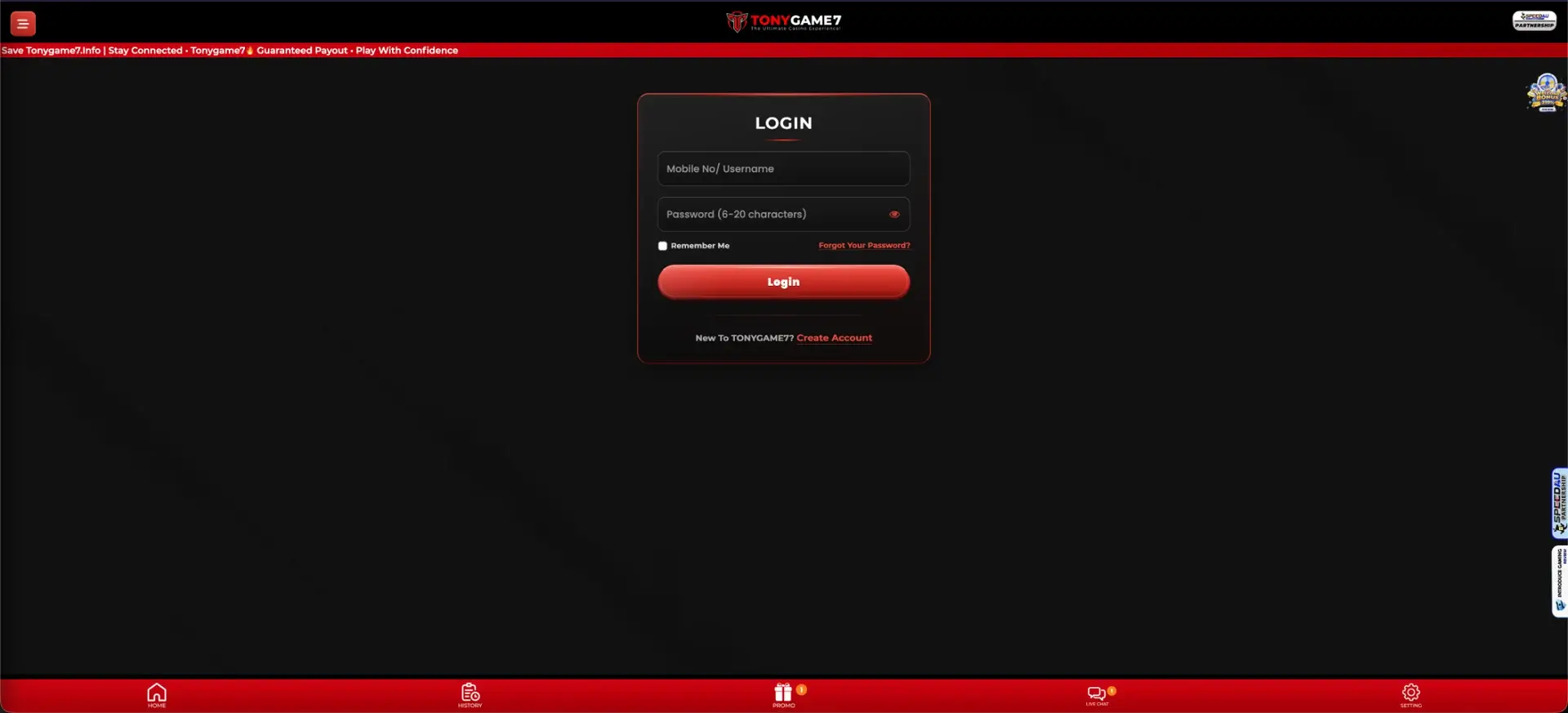
Tonygame7 login on desktop
On a computer, the login form opens from the lobby or directly from the login page. The process takes under a minute:
- Open an official Tonygame7 address: tonygame7.org or tonygame7.org.
- Press LOGIN in the panel on the right of the lobby.
- Enter the mobile number or username in the "Mobile No / Username" field.
- Enter the password (6 to 20 characters). The eye icon shows the characters to check for typos.
- Tick Remember Me only on a private computer.
- Press Login. The AUD balance and the Deposit, Withdraw and Refresh buttons appear in the panel.
After sign-in, the bottom bar gives access to Home, History, Promo, Live Chat and Setting.
Tonygame7 login on a smartphone
The mobile site uses the same form and the same account details. On Android, the app opens with the same form.
- Open tonygame7.org or tonygame7.org in Safari or Chrome, or launch the Android app.
- Open the menu at the top left or press LOGIN on the home screen.
- Enter the mobile number or username and the password.
- Press Login. The balance appears and the bottom bar becomes active.
On a phone, Remember Me saves time. It is safest when the phone itself is locked with a PIN or biometrics.
Restoring access to a Tonygame7 account
Password recovery is tied to the mobile number confirmed by SMS at registration, so that number is the key to the account.
- On the login form, press "Forgot Your Password?" under the password field.
- Enter the registered mobile number.
- Request the verification code and enter it when the SMS arrives.
- Set a new password of 6 to 20 characters, different from the old one.
- Log in with the new password and check the balance and History tab.
If the registered number is no longer in use, the reset cannot complete by SMS. In that case, live chat confirms ownership using the full name, which must match the bank account, and the details of recent deposits.
Why the Tonygame7 login fails
A failed sign-in almost always has a simple cause. The sections below cover the most common ones, in order of how often they come up.
Wrong details
Most failed logins are typing errors. Check these first:
- Number format: the same format as at registration, with the 61 country code if it was used then.
- Caps Lock and automatic capitals on mobile keyboards.
- Password length: under 6 or over 20 characters cannot be valid.
Site address blocked or changed
Australian internet providers block some gambling domains at ACMA's request. When the usual address does not load, the account is fine. Only the address has changed.
- Try tonygame7.org or tonygame7.org.
- Use the "Backup Link Mates" button shown in live chat.
- Check the Tonygame7 Telegram channel for current addresses.
SMS code delays
Codes are sent by SMS to the registered number. Delays usually come from the phone side:
- Weak signal or flight mode.
- Spam filters that hide short-code senders.
- Repeated requests in a short time, which can delay sending.
Account restriction
An account can be restricted after a name mismatch at withdrawal, a duplicate account, or a request from the player to pause play. The login form shows an error, and only support can lift the restriction.
- Open Live Chat from the bottom bar of the site.
- Give the registered mobile number and full name.
- Have recent deposit details ready: amount, date, method.
Protecting the Tonygame7 account
The account holds real AUD and is linked to a bank PayID, so the login deserves the same care as online banking. Key habits:
- Official domains only: tonygame7.org and tonygame7.org, as listed in the live chat notice. A look-alike address with an extra letter or a different ending is a phishing copy.
- No logins from message links: type the address or use a saved bookmark instead.
- Unique password: 6 to 20 characters, ideally close to 20, not reused on any other site.
- SMS codes stay private: Tonygame7 staff do not need a code to help with an account.
- Shared devices: no Remember Me, and log out through Setting when finished.
One person, one account
The Tonygame7 registration form requires the full name to match the bank account name, and withdrawals check this. A second account under the same name and bank details cannot pass that check. It risks both accounts being restricted, and any bonuses on them being cancelled. A forgotten password is fixed through recovery or live chat. The original account keeps its balance, VIP progress and accumulated deposit, which count towards tier upgrades from AUD 3,000.
Inside the Tonygame7 account
After login, the account's main tools sit in the right-hand panel and the bottom bar. The table shows where to find each one.
| Section | What it shows |
|---|---|
| Balance panel | AUD balance, minimum deposit (AUD 10), minimum withdrawal (AUD 50), Deposit / Withdraw / Refresh |
| History | Deposits, withdrawals, bonus claims and their statuses |
| Promo | Free events, welcome bonuses, quests, rebate and commission, each with a Claim button |
| Live Chat | Support, official links, rebate and commission timing |
| Setting | Account settings and logout |
| Side menu | VIP Bonus, Mini Game, Lucky Shop, Top 20 Tournament, Daily Check-in, invite tools |
The Refresh button updates the balance after a deposit, without reloading the page.
When extra checks are requested
The Tonygame7 login itself needs only a number and password. Checks come up at withdrawal time, when the receiving PayID or bank account name is compared with the registered full name. If support asks for documents to confirm identity, the usual ones are photo ID (driver licence or passport) and proof that the receiving account belongs to the player, such as a capture from the banking app with the name visible. The name on all of them must match the name entered at registration, letter for letter.
Questions and answers
Quick answers to the questions that come up most often around the Tonygame7 login.
What does the Tonygame7 login require?
The mobile number or username used at registration, and the password of 6 to 20 characters.
How is a forgotten Tonygame7 password reset?
Press "Forgot Your Password?" on the login form and confirm the registered mobile number by SMS code. If the number has changed, live chat restores access after checking the account details.
Why does the Tonygame7 site not open?
The address may be blocked by the internet provider. The official Aussie links are tonygame7.org and tonygame7.org, and live chat offers a backup link.
Does one Tonygame7 account work on Android and iPhone?
Yes. The same account works in the Android app, in mobile browsers and on desktop, with one shared AUD balance.
Is it safe to tick Remember Me?
On a personal device locked with a PIN or biometrics, yes. On shared or public computers, leave it unticked and log out after each session.
Is a new account an option after losing access?
No. A second account with the same name and bank details breaks the one-account rule and fails the withdrawal name check. Access is restored through password recovery or live chat.
Updated 25 October 2026.